Wednesday, February 4, 2015

A Single-Record Merge Statement

The Single-Record Merge Statement

I was looking for a very simple, pared-down example of a MERGE statement to use in teaching/training. Couldn't find one, so I made this one up.

In the process, I found that getting the @@IDENTITY value out of an inserted record in a MERGE statement is not supported. You have to set up a table variable to capture the IDENTITY-created value, then move it to a scalar variable.

This makes MERGE fairly clunky, in terms of code clarity, for this use case. However, there are certainly cases where the reduced seeks might make this worthwhile.

For this example, we'll use the Northwinds reference database Products table:


So here's the desired task, written as a stored procedure without using the MERGE statement:

CREATE PROC changeProductPrice
   @productID int = NULL,
   @newPrice money,
   @newProductName nvarchar(40), 
   @newProductID int = NULL OUTPUT
AS
   IF EXISTS(SELECT * FROM Products WHERE productID = @productID) 
   BEGIN
      UPDATE Products
      SET unitprice = @newPrice
      WHERE  productID = @productID
   END
   ELSE
   BEGIN
      INSERT INTO Products
      (unitprice, ProductName)
      VALUES (@newPrice, @newProductName)

      SET @newProductID = @@IDENTITY
   END
GO

The situation is:
  • there is a Product that may or may not exist as a record in the Products table
  • if the Product already exists, we'd like to update the unitPrice
  • if the Product record doesn't exist, we'd like to add the record
  • we also want to return the productID of the product if it is a new record
This is a fairly classic issue - UPDATE if it's already there, INSERT if it isn't.

Using the Stored Procedure requires 2 seeks on the table:
  1. see if the record exists 
  2. locate the record to either UPDATE or find the location to INSERT (this might be an append if ProductID is an IDENTITY field)
See the resulting query plan:


So here's how to do it as a MERGE statement:


CREATE PROC changeProductPriceMerge
   @productID int = NULL,
   @newPrice money,
   @newProductName nvarchar(40), 
   @newProductID int =NULL OUTPUT
AS

   DECLARE @newProductIDTable table(productID int);

   MERGE  Products 
      USING (SELECT  @productID, 
                     @newPrice, 
                     @newProductName) 
               AS source ( 
                     productID, 
                     newPrice, 
                     newProductName)
      ON  (Products.productID = source.productID)
      WHEN MATCHED THEN
         UPDATE 
            SET unitprice = source.newPrice
      WHEN NOT MATCHED THEN
         INSERT ( unitPrice, 
                  productName) 
         VALUES ( source.newPrice, 
                  source.newProductName)
   OUTPUT inserted.productID INTO @newProductIDTable;

   SELECT TOP 1 @newProductID = productID FROM @newProductIDTable;
GO   

Frankly, I was hoping that the MERGE solution would be more elegant than using an IF statement to choose between INSERT and UPDATE. Don't think it ended up that way.

But this is still a very pared-down example of MERGE.

Let's go through the main parts of the MERGE statement:

  • MERGE - this is where we state which table will possibly be modified. In this case it is the Products table. This is sometimes renamed as [target] to be clear which table will possibly change.
  • USING - this is where we define the data that will be used to:
    • determine what will happen to records in the [target] (INSERT, UPDATE, DELETE, nothing)
    • used as values to make something happen in the [target]
  • ON - this must be a logical expression (evaluates to true or false), and is usually in the form of a JOIN-like expression that relates [target] and [source] records
  • WHEN MATCHED - defines the operation to occur when the expression in the ON clause evaluates to true
  • WHEN NOT MATCHED - defines the operation to occur when the expression in the ON clause evaluates to false
  • OUTPUT - used to get the data that was affected by the MERGE statement. In this case, we are using it to get the database-generated IDENTITY value
The clunky portion to all this is that the OUTPUT clause can only accept a Table (or Table variable) in the INTO portion. As a result, it's necessary to create a Table variable, @newProductTable, to hold the new IDENTITY scalar value. 

However, this is more of a declarative way to state this operation, and results in only a single seek on the Products table.

Here's the query plan for the MERGE version of the stored procedure:
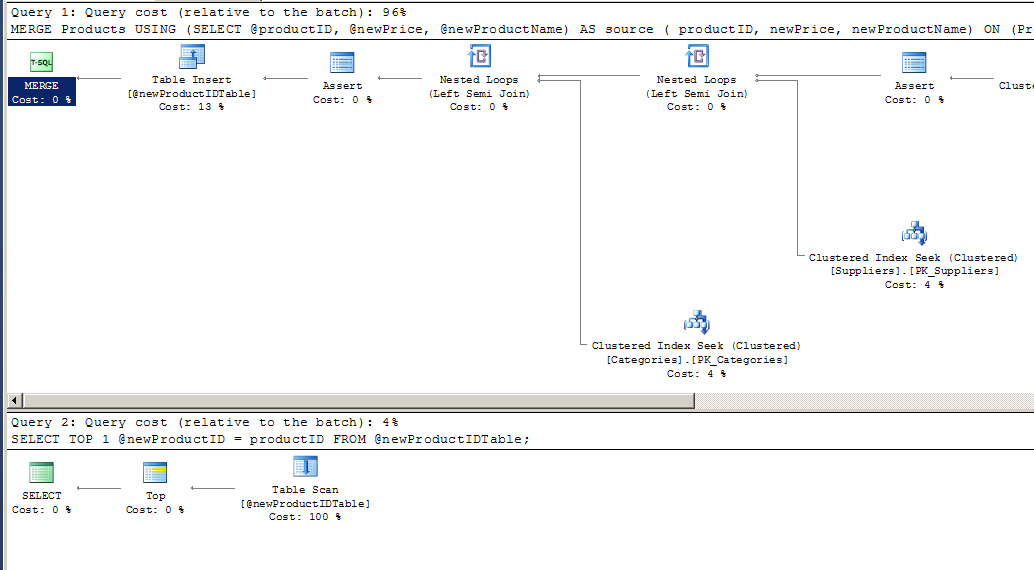


There are still two separate operations, due to the clunky handling of the new IDENTITY value in a table variable. 

If the Products table were very large, and ProductID were not set as an IDENTITY field, the MERGE version might be faster. However, the MERGE version requires the instantiation of a table variable.

If we wrote this without providing the productID back as an OUTPUT, the MERGE version would certainly use only one operation.

All of this is not to say that MERGE is not helpful, but I think in this single-record situation, I'd choose the non-MERGE version for clarity.

Logical and Physical IOs: A chili-cooking analogy

I was teaching a class today, covering the topic of indexes with some hands-on activities.

A group of students get some card-stock pages with data on them, each one representing an 8K data or index page. With these, we go through a number of database read operations and look at the IOs that are generated.

This is a great exercise, because it focuses attention on IO, rather than computation.

However, I found that the students had some trouble differentiating between a physical IO and a logical IO. Or realizing that an IO was either logical or physical, and wasn't be both.

So I came up with a chili-cooking analogy.

Suppose I am cooking chili and need a can of kidney beans.

If I go to my cupboard, and there is no can of beans, then I'll need to get in the car and go to the store.

Dang.

That would be like a physical IO. The can of beans is not in my cupboard, and it's a pain (in time and effort) to go to the store for the can of beans.

If I go to the cupboard, and the can of beans is already there, then I don't need to go to the store.

Cool.

That would be like a logical IO. The can of beans is right there handy, and I don't need to spend the time and effort to go to the store.

This is not a perfect analogy, but it has some good parallels.

  • I need a can of beans. This is like the SQL Engine needing a data page. It would be considered an IO request. But we don't yet know whether it will be a logical or physical IO.
  • The can is in my cupboard or it is not.
    • It's in my cupboard. This is like a logical IO. No reason to go to disk (store).
    • It's not in my cupboard. This is like a physical IO. Have to go to the disk (store).
So I'm either going to the store (physical IO) or I'm not (logical IO). 

So why count logical IOs? 

Well, logical IOs are kind of bonus; you can't count on them. (Sometimes that can of beans is in the cupboard, and sometimes its not.) If you have an operation that takes 1000 IOs, it might be all physical IOs the first time, and all logical the next time. So, you should be looking at total IOs as a measure of potential IOs for the operation. 


Wednesday, January 28, 2015

Always define a Unique Grouping

I've written before about providing a unique ordering. The idea being that downstream systems and developers could begin to depend on records always coming back in the same order. Without having something truly unique in your ORDER BY clause (like a primary key), results could be coming back in different orders.

When using GROUP BY, its even more important to ensure that the grouping is always going to be unique.

Let's look at a fairly obvious example using the Products table from the Northwind database.


Consider this statement:

    SELECT   ProductName,
             AVG(unitPrice) AS [AvgUnitPrice]
    FROM     Products
    GROUP BY ProductName
    ORDER BY ProductName


This is perfectly valid syntax. The resulting records will look fine also.

However, there is a chance that two (or five) products will have the same name, and will get placed into the same group. In this case, the results of this statement are not correct.

The safest thing to do, for this query is to add the ProductID to the GROUP BY clause like this:

    SELECT   ProductName,
             AVG(unitPrice) AS [AvgUnitPrice]
    FROM     Products
    GROUP BY ProductName,
             ProductID
    ORDER BY ProductName


This ensures that the grouping is correct, and that the averages will be correct. However, it still has the problem that the ordering is now not necessarily unique. (As addressed here.)

To also provide a unique ordering, you'd add the ProductID to the ORDER BY also:

    SELECT   ProductName,
             AVG(unitPrice) AS [AvgUnitPrice]
    FROM     Products
    GROUP BY ProductName,
             ProductID
    ORDER BY ProductName,
             ProductID


Wednesday, January 21, 2015

Always define a unique ordering

Your SELECT statements should always have a unique ordering.

This ensures that "downstream" systems/code that consumes the data doesn't assume (wrongly) that the data is always in the same order.

Let me describe this using the Products table from the MS Northwind database.


Consider this SQL:

SELECT   ProductName
FROM     Products
ORDER BY ProductName

This is syntactically correct SQL, and we'll assume that it returns the correct records.

If all the products have a different ProductName, this will provide a unique ordering of the records. In other words, each time the SELECT statement is executed, the records come back in the same order.

However, in a dynamic environment, with a large number of records, it is likely that two products could have the same ProductName, e.g., "Socks", "Lipstick", "Hammer". (Unless uniqueness is enforced on ProductName.)

The danger here is that downstream systems or consumers of the data from this SELECT statement might actually depend on the records always being in the exact same order. And when they are not, things can go wrong.

So why would a programmer downstream assume that the records are in order? Well, why not? At first glance, they look like they are in order. But with a million records that are changing, how could the programmer be sure? And why sort a million records that look like they are already in order?

A simple safe SQL practice is to always specify a unique ordering. In this case, adding ProductID to the ORDER BY statement would be easy:

SELECT   ProductName
FROM     Products
ORDER BY ProductName, ProductID

This is not likely to be noticed by anyone, and may never make a difference. But it can prevent future errors.

By the way, I encountered a very similar situation on a large software project. The database people said the data was sorted, the programmers wrote their code to depend on the sort. And visual inspection of the data made us think it was sorted. We ended up noticing the changing order of records as we were stepping through code in a debugger. In other words, we were convinced it was a logic error in the code.

Followers