Wednesday, April 1, 2015

What do good data models look like?

So you have a new database to look at, and you want a quick take on what you are in for.

Assuming that the database is meant for online transaction processing (OLTP), here's a very rough way to look at it.

Baaaaad Data Model

The picture below represents, in my mind, the prototypical low-quality data model. It has only a few tables, but each table is "wide" - it has a lot of fields in it. There are also only a few ways that the tables are clearly related. In short, the bad data model:
  • has few tables 
  • the tables have lots of columns in them
  • the tables are not tightly related

Baaaad Data Model

Goooood Data Model

So what does a good data model look like? Lots of tables, not very many columns per table, with lots of relationships. In the picture below, the "not very many columns" is represented by the narrow rectangles.

In short, a high-quality data model has:

  • lots of tables
  • few columns per table
  • lots of relationships 

Gooood Data Model
Why?

The OLTP  use case has a few common characteristics:

  • it supports multiple systems and many users concurrently
  • it doesn't know when work will arrive - episodic traffic rather than periodic
  • it doesn't know what work will arrive - traffic is made up of all operations: SELECT, INSERT, UPDATE, DELETE
  • data quality is of high importance

Relational database management systems were created to directly address the OLTP use case, and they do it well.

The characteristics above imply the characteristics that a high-quality data model should have:

  • it should be clear and descriptive of the data
  • it should enforce data quality
  • it should be flexible

Clear and Descriptive

A high-quality data model should be a "picture that is worth a thousand words". You should be able to look at the data model, and figure out what the organization does. You should be able to see every person, place, thing, idea, event, and transaction that is important to the organization. The names of tables should be consistent with the language of the organization. If the organization refers to a "agreement", the table representing it should not be called "contract", "lease",  "arrangement", "accord", "pact", etc.

High-quality data models have a table for each entity (lots of tables). So each entity is identified separately and given a name. Low-quality data models have multiple entities stored in a single table (few tables). So multiple entities are combined into a single table, and hidden. They have no name, and are undocumented.

Data Quality

A high-quality data model should help to enforce that data is reasonable as it is enters the database. In a high-quality data model, each relationship represents a referential integrity CHECK constraint. This is one way that data is checked for reasonableness as it enters the database. So, a data model that has lots of relationships is checking for reasonableness in many places, and making sure "stupid errors" don't occur. 

A high-quality data model that is clear and descriptive also clarifies what accurate data should look like. A single-entity table clarifies what a reasonable record should look like. It makes it easy to define other CHECK constraints. 

A low-quality data model with few relationships has not captured all the different referential integrity CHECK constraints that could be used to maintain data quality. Furthermore, a large table that represents multiple entities makes it difficult to know what a reasonable record should look like. 

Flexibility

This is probably the most subtle, and hardest to grok without experience. 

A high-quality data model should be flexible. It should work well with all current and future systems. It should accept new features without excessive effort. It should accept bug fixes and modifications elegantly. It should not be difficult to work with from one perspective, but easy from another. In short, it should not suffer from program-data dependence. 

High-quality data models store the data in a form uninfluenced by any particular systems' usage of the data. Clear single-entity tables describe and store the data, rather than promote a particular usage of the data. Relationships describe how entities relate, regardless of systems' usage.

Low-quality data models typically impose a bias on usage of the data. When multiple entities are in a single table, the data is stored pre-JOINed in a certain manner. It is difficult to JOIN in other ways. It is also more difficult to separate one entity from an entity that it is pre-JOINed with.

Qualifications

Your mileage may vary according to your situation. Data models are not really good/bad. They have advantages and disadvantages, depending on situations.  

This is a high-level way to get a quick read on a database before digging into the details. I think it's also a good way to remain grounded in the objectives of clarity, data quality, and flexibility.


Tuesday, February 10, 2015

Fix for Zoomit.exe Error launching 64-bit version...

Had a small problem trying to get Zoomit running on a machine. It stopped working after some changes to our Group Policy in a response to a nasty virus that hit our network.

I use Zoomit frequently, and the Windows Magnifier is really not a satisfactory substitute.

Here's the error I was getting when I tried to install it:


Our tech support person found this post by Andrew Potts. It worked, but it lacked a few details that I had to work out. So I thought I would expand on it.

So it seems that running ZoomIt.exe attempts to write something into the Temp folder, which is blocked by the group policy. Apparently, this is only a problem on 64-bit machines.

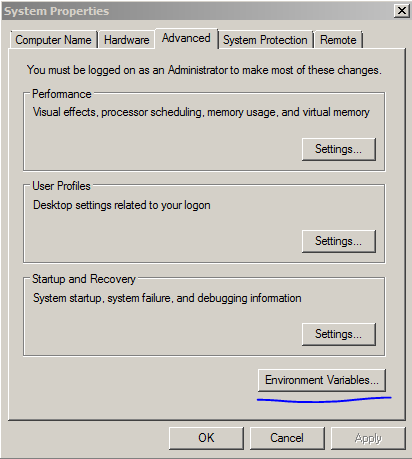
The Temp folder is defined as an environment variable, which you can change in the Control Panel under System:

Or, if you are comfortable at the command line, you can change this with the SET command:

SET TEMP=C:\temp1

So here's the exact steps that I used to fix this on my machine:

  1. get to a command prompt by running cmd under Start|Run
  2. run the command "SET" to see the current environment variables including TEMP (no command arguments, just the command SET)
  3. record the current TEMP variable value - you'll probably want to set this back to the original when you are done
  4. create a folder C:\temp1
  5. copy the ZoomIt.exe to the C:\temp1 folder
  6. run the command "SET TEMP=C:\temp1" - sets the TEMP variable to the new folder
  7. run the command "cd C:\temp1" - changes the working directory to the new folder
  8. run the command "ZoomIt.exe" - runs the installer
  9. you should now see a file "C:\temp1\ZoomIt64.exe" 
  10. run the "SET TEMP=..." command to set the TEMP variable back to its original value
You can copy this file wherever you want, or simply leave it where it is and create a shortcut to it.


Wednesday, February 4, 2015

One Way to Think About SQL Joins: It's just a WHERE Clause

When I teach relational database, I have several ways that I present the concept of joins.

One way to think about a join is that it is simply a WHERE clause.

Take the following data model from the MS Northwinds reference database. 


I've modified the data so that we can focus on a limited number of records, and see what's going on more clearly.

    SELECT  SupplierID,
            CompanyName
    FROM    Suppliers

gives:

    SupplierID  CompanyName
    ----------- ----------------------------------------
    3           Grandma Kelly's Homestead

    9           PB Knäckebröd AB
and

    SELECT  ProductID,
            SupplierID,
            ProductName
    FROM    Products

gives:

    ProductID   SupplierID  ProductName

    ----------- ----------- --------------------------------
    7           3           Grandma's Boysenberry Spread
    8           3           Uncle Bob's Organic Dried Pears
    9           3           Northwoods Cranberry Sauce
    23          9           Gustaf's Knäckebröd
    24          9           Tunnbröd

Given those tables and data, consider this statement:

SELECT   Suppliers.SupplierID,
         Suppliers.CompanyName,
         Products.ProductID,
         Products.SupplierID,
         Products.ProductName
FROM     Suppliers,
         Products
ORDER BY Suppliers.SupplierID,
         Products.ProductID   

Notice that there is no explicit JOIN statement. (So this is a CROSS JOIN) This SELECT statement returns:

SupplierID  CompanyName                 ProductID   SupplierID  ProductName
----------- --------------------------- ----------- ----------- -------------------------------
3           Grandma Kelly's Homestead   7           3           Grandma's Boysenberry Spread
3           Grandma Kelly's Homestead   8           3           Uncle Bob's Organic Dried Pears
3           Grandma Kelly's Homestead   9           3           Northwoods Cranberry Sauce
3           Grandma Kelly's Homestead   23          9           Gustaf's Knäckebröd
3           Grandma Kelly's Homestead   24          9           Tunnbröd
9           PB Knäckebröd AB            7           3           Grandma's Boysenberry Spread
9           PB Knäckebröd AB            8           3           Uncle Bob's Organic Dried Pears
9           PB Knäckebröd AB            9           3           Northwoods Cranberry Sauce
9           PB Knäckebröd AB            23          9           Gustaf's Knäckebröd
9           PB Knäckebröd AB            24          9           Tunnbröd

A CROSS JOIN gives all possible combinations of the records in Suppliers and the records in Products. Think of the database engine as saying "You haven't specified how to match up the records, so I'm assuming any record can match with any other record."

But clearly, there in the resulting combinations, some suppliers are shown next to products that they do not supply, i.e., the supplierID from the supplier record does not match the supplierID from the product record (highlighted in red below):

SupplierID  CompanyName                 ProductID   SupplierID  ProductName
----------- --------------------------- ----------- ----------- -------------------------------
3           Grandma Kelly's Homestead   7           3           Grandma's Boysenberry Spread
3           Grandma Kelly's Homestead   8           3           Uncle Bob's Organic Dried Pears
3           Grandma Kelly's Homestead   9           3           Northwoods Cranberry Sauce
3           Grandma Kelly's Homestead   23          9           Gustaf's Knäckebröd
3           Grandma Kelly's Homestead   24          9           Tunnbröd
9           PB Knäckebröd AB            7           3           Grandma's Boysenberry Spread
9           PB Knäckebröd AB            8           3           Uncle Bob's Organic Dried Pears
9           PB Knäckebröd AB            9           3           Northwoods Cranberry Sauce
9           PB Knäckebröd AB            23          9           Gustaf's Knäckebröd
9           PB Knäckebröd AB            24          9           Tunnbröd

But some suppliers are shown next to products that they do supplier, i.e., the supplied ID from the supplier record does match the supplierID from the product record (highlighted in green below):

SupplierID  CompanyName                 ProductID   SupplierID  ProductName
----------- --------------------------- ----------- ----------- -------------------------------
3           Grandma Kelly's Homestead   7           3           Grandma's Boysenberry Spread
3           Grandma Kelly's Homestead   8           3           Uncle Bob's Organic Dried Pears
3           Grandma Kelly's Homestead   9           3           Northwoods Cranberry Sauce
3           Grandma Kelly's Homestead   23          9           Gustaf's Knäckebröd
3           Grandma Kelly's Homestead   24          9           Tunnbröd
9           PB Knäckebröd AB            7           3           Grandma's Boysenberry Spread
9           PB Knäckebröd AB            8           3           Uncle Bob's Organic Dried Pears
9           PB Knäckebröd AB            9           3           Northwoods Cranberry Sauce
9           PB Knäckebröd AB            23          9           Gustaf's Knäckebröd
9           PB Knäckebröd AB            24          9           Tunnbröd

So, if we were to add a condition in the WHERE clause that enforced that only the records in green above should be shown:

SELECT   Suppliers.SupplierID,
         Suppliers.CompanyName,
         Products.ProductID,
         Products.SupplierID,
         Products.ProductName
FROM     Suppliers,
         Products
WHERE    Suppliers.SupplierID = Products.SupplierID
ORDER BY Suppliers.SupplierID,
         Products.ProductID 

Then we would get the suppliers matched up with the correct products:

SupplierID  CompanyName                 ProductID   SupplierID  ProductName
----------- --------------------------- ----------- ----------- -------------------------------
3           Grandma Kelly's Homestead   7           3           Grandma's Boysenberry Spread
3           Grandma Kelly's Homestead   8           3           Uncle Bob's Organic Dried Pears
3           Grandma Kelly's Homestead   9           3           Northwoods Cranberry Sauce
9           PB Knäckebröd AB            23          9           Gustaf's Knäckebröd
9           PB Knäckebröd AB            24          9           Tunnbröd


A Single-Record Merge Statement

The Single-Record Merge Statement

I was looking for a very simple, pared-down example of a MERGE statement to use in teaching/training. Couldn't find one, so I made this one up.

In the process, I found that getting the @@IDENTITY value out of an inserted record in a MERGE statement is not supported. You have to set up a table variable to capture the IDENTITY-created value, then move it to a scalar variable.

This makes MERGE fairly clunky, in terms of code clarity, for this use case. However, there are certainly cases where the reduced seeks might make this worthwhile.

For this example, we'll use the Northwinds reference database Products table:


So here's the desired task, written as a stored procedure without using the MERGE statement:

CREATE PROC changeProductPrice
   @productID int = NULL,
   @newPrice money,
   @newProductName nvarchar(40), 
   @newProductID int = NULL OUTPUT
AS
   IF EXISTS(SELECT * FROM Products WHERE productID = @productID) 
   BEGIN
      UPDATE Products
      SET unitprice = @newPrice
      WHERE  productID = @productID
   END
   ELSE
   BEGIN
      INSERT INTO Products
      (unitprice, ProductName)
      VALUES (@newPrice, @newProductName)

      SET @newProductID = @@IDENTITY
   END
GO

The situation is:
  • there is a Product that may or may not exist as a record in the Products table
  • if the Product already exists, we'd like to update the unitPrice
  • if the Product record doesn't exist, we'd like to add the record
  • we also want to return the productID of the product if it is a new record
This is a fairly classic issue - UPDATE if it's already there, INSERT if it isn't.

Using the Stored Procedure requires 2 seeks on the table:
  1. see if the record exists 
  2. locate the record to either UPDATE or find the location to INSERT (this might be an append if ProductID is an IDENTITY field)
See the resulting query plan:


So here's how to do it as a MERGE statement:


CREATE PROC changeProductPriceMerge
   @productID int = NULL,
   @newPrice money,
   @newProductName nvarchar(40), 
   @newProductID int =NULL OUTPUT
AS

   DECLARE @newProductIDTable table(productID int);

   MERGE  Products 
      USING (SELECT  @productID, 
                     @newPrice, 
                     @newProductName) 
               AS source ( 
                     productID, 
                     newPrice, 
                     newProductName)
      ON  (Products.productID = source.productID)
      WHEN MATCHED THEN
         UPDATE 
            SET unitprice = source.newPrice
      WHEN NOT MATCHED THEN
         INSERT ( unitPrice, 
                  productName) 
         VALUES ( source.newPrice, 
                  source.newProductName)
   OUTPUT inserted.productID INTO @newProductIDTable;

   SELECT TOP 1 @newProductID = productID FROM @newProductIDTable;
GO   

Frankly, I was hoping that the MERGE solution would be more elegant than using an IF statement to choose between INSERT and UPDATE. Don't think it ended up that way.

But this is still a very pared-down example of MERGE.

Let's go through the main parts of the MERGE statement:

  • MERGE - this is where we state which table will possibly be modified. In this case it is the Products table. This is sometimes renamed as [target] to be clear which table will possibly change.
  • USING - this is where we define the data that will be used to:
    • determine what will happen to records in the [target] (INSERT, UPDATE, DELETE, nothing)
    • used as values to make something happen in the [target]
  • ON - this must be a logical expression (evaluates to true or false), and is usually in the form of a JOIN-like expression that relates [target] and [source] records
  • WHEN MATCHED - defines the operation to occur when the expression in the ON clause evaluates to true
  • WHEN NOT MATCHED - defines the operation to occur when the expression in the ON clause evaluates to false
  • OUTPUT - used to get the data that was affected by the MERGE statement. In this case, we are using it to get the database-generated IDENTITY value
The clunky portion to all this is that the OUTPUT clause can only accept a Table (or Table variable) in the INTO portion. As a result, it's necessary to create a Table variable, @newProductTable, to hold the new IDENTITY scalar value. 

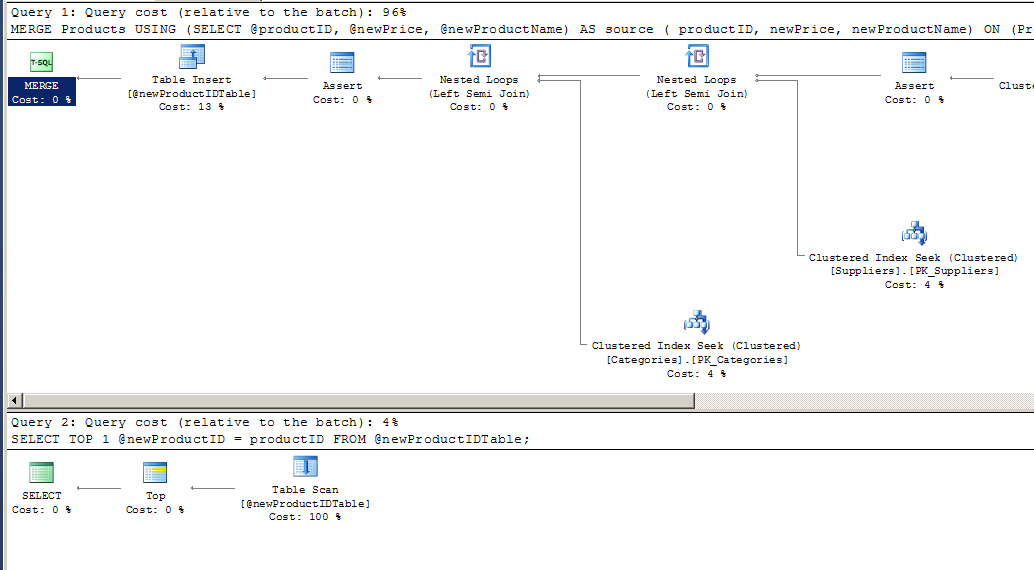
However, this is more of a declarative way to state this operation, and results in only a single seek on the Products table.

Here's the query plan for the MERGE version of the stored procedure:


There are still two separate operations, due to the clunky handling of the new IDENTITY value in a table variable. 

If the Products table were very large, and ProductID were not set as an IDENTITY field, the MERGE version might be faster. However, the MERGE version requires the instantiation of a table variable.

If we wrote this without providing the productID back as an OUTPUT, the MERGE version would certainly use only one operation.

All of this is not to say that MERGE is not helpful, but I think in this single-record situation, I'd choose the non-MERGE version for clarity.

Followers